Expertise
Our approachCasesCareersContactSEA
SEO
CRO
Social
Data
AI Marketing
WHAT WE SPECIALISE IN
SEO
Social
Need help setting up Google Tag Manager (GTM)? At DGTLbase you can outsource your Google Tag Manager set-up: our specialists know and measure what matters for your business & website.
Google Tag Manager is a free tag management system that lets you quickly implement tracking tags or code snippets on your site. Setting up Google Tag Manager as a tool lets you store all your tracking tags in one central place.
You can also speed up the development time needed to implement complex tracking. Google Tag Manager works with a range of Google tools.








With Google Tag Manager you add, change or remove tags without technical knowledge. That way you keep maximum control over your tracking, without depending on developers.

Thanks to GTM's flexibility, you can easily test new ideas and campaigns. Adjust strategies quickly and respond effortlessly to trends, all without delay.
GTM loads tags asynchronously for optimal page speed and keeps all your tracking organised in one place. Fewer errors, more efficiency.
Google Tag Manager lets users, such as marketers, implement tags without extensive coding knowledge.
Thanks to the user-friendly interface, users can edit, remove or add GTM tracking code without the help of web developers.
This means that, for example, small businesses with limited technical support can still maximise their online tracking.
As Google Tag Manager doesn't require a web developer, it gives marketers the freedom to experiment and test different strategies or ideas.
It offers the flexibility to run experiments quickly and improve strategies in line with new digital marketing trends, without having to wait for outside help.
Google Tag Manager is set up so that tags run asynchronously rather than synchronously.
This means each tag fires as soon as it loads, instead of waiting for every tag to load before firing. This eliminates the risk of one slow-loading tag holding up the rest.
Because all GTM tracking code is managed in one place, rather than created and managed across different platforms, Google Tag Manager simplifies and improves the whole process of using tags.
Being able to create and view all deployed tags in one simple interface eliminates repetition and potential errors, and greatly improves efficiency instead.
GTM is an important part of Google Analytics 4.
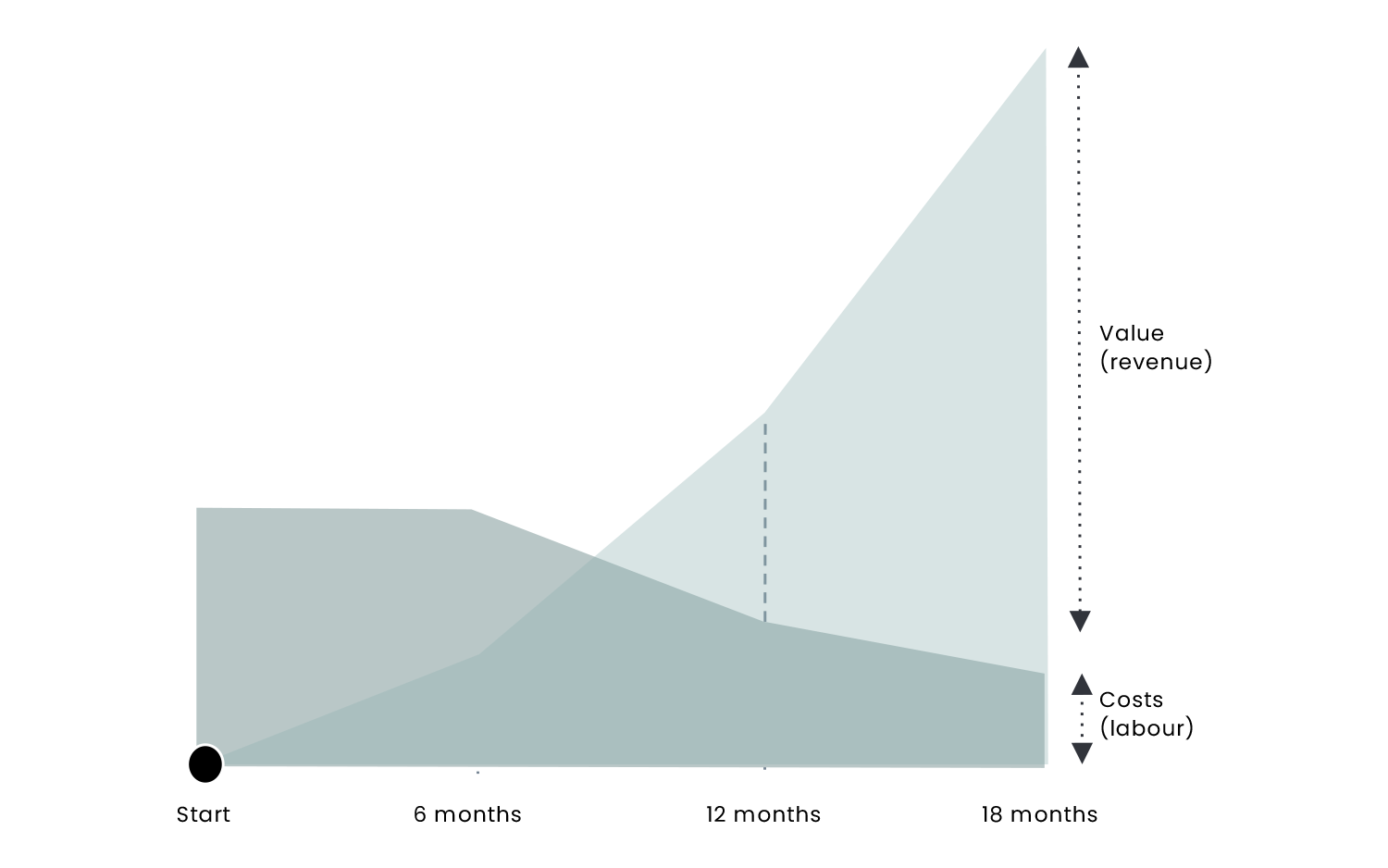
Work with an experienced digital marketing agency.
These are cases we have worked on before in the field of Digital Analytics.
Focused on return on investment (ROI), we will tackle new and existing campaigns with you and set up Google Tag Manager to grow your business online quickly and profitably.
Our specialists are keen to take on the challenge together with you. Are you ready?
4.9
/5
★★★★★
★★★★★
The trusted experts in running your Google Ads/SEM in the most efficient and effective way. They have a proven track record of delivering excellent results across multiple markets for advertisers of all levels. Just as important, they know multiple search platforms such as Google and Bing and have great client consulting skills.

Fadii - Adidas
★★★★★
True SEO & content marketing champions. With a lot of passion and success, they put SEO on the map at RAI. Their strength is that they connect well with both the technical and the business side. Great to work with such results-driven professionals!
Anita - Rai Amsterdam
★★★★★
A dedicated, ambitious and distinctive SEO expert. Over the past year, we worked together in our marketing department on various optimisation projects, which brought our e-commerce activities in multiple markets back to the top of Google’s rankings. With a data-driven mindset and a collaborative spirit, hard work becomes fun. I’d definitely recommend it if you want your website to be top of the class!
Noel - Recharge
★★★★★
I worked with DGTLbase for 2 years and my experience was pleasant. They helped serve a shared client and were especially good and useful for SEO-related work. Where I could advise the client on the IT side of their platform, DGTLbase could advise them on virtually anything related to content or SEO.

York Broekhuizen - Rodi Media
★★★★★
We’ve been using DGTLbase’s SEO, PPC and strategy services for over two years. They’re always extremely knowledgeable, helpful and great to work with. We found their SEO advice very valuable, resulting in a 150% increase in traffic from search engines such as Google and Bing over the past two years.

Martin Kilarski - o9 solutions
★★★★★
We are extremely satisfied with our collaboration with DGTLbase. They achieved strong results for us in SEO and advertising. Thanks to their strategic approach and in-depth knowledge, we not only increased our online visibility but also saw significant growth in traffic and conversions. The team is proactive, really thinks along with you and delivers tailored solutions that fit our goals. If you’re looking for a reliable partner that delivers results, DGTLbase is definitely recommended!

Anis Baldi - Diversity Modest
★★★★★
I had the pleasure of working with Desmond and his team at DGTLbase in 2021. They were very helpful and thorough in their research, and also provided informative research and briefings for SEO optimisation.

Huan Nguyen - JDE Peet's
★★★★★
For Nimani’s online marketing, we work with DGTLbase on advertising and, more recently, SEO as well. A great collaboration with Karim and Desmond’s team, who think along with us strategically and with our budget in mind. That translates into great results! Definitely recommended if you want to grow your business online!

Nimani Real Estate
★★★★★
I’m hugely impressed by DGTL Base, a leading online marketing agency in Amsterdam. Their expertise in SEO advice and Google Ads consultancy has had a significant impact on my company’s online visibility. The combination of their personal approach and professional insights makes them truly unique. For anyone looking to improve their digital marketing, DGTL Base is the perfect choice!

Andu - Crypto Takkies
★★★★★
Young but experienced team. Great collaboration with this online marketing agency.
Frank Mulder - rnw media
★★★★★
If your business needs conversion optimisation or SEO support to scale, DGTLbase is a no-brainer. Get in touch with the professionals there and see how they turn your online presence into a dream come true.

Benjamin Sam - Omek
We work for SMEs and corporates with a clear growth or efficiency ambition, from Adidas and Philips to ICON Amsterdam and A’DAM Lookout. That’s where we have a proven track record





We’re proud to be recognised by leading companies. Below are some of the outlets where we’ve been featured.








Thank you! We’ve received your request and will get back to you soon.
Something went wrong while sending. Please try again.
Read more information.
How can DGTLbase help you with Google Tag Manager?
+
Google Tag Manager is a powerful tool that is easy to use. It is a centralised platform that lets marketers keep up with digital marketing trends and Digital Analytics while making their website faster.
GTM offers significant opportunities to improve your website by tracking PDF downloads, scroll behaviour, link clicks, form submissions, video activity and much more.
The platform lets the user measure, analyse and take action-oriented steps to improve your online marketing and website performance!
Although GTM is valued for its simplified website and marketing tracking capabilities, setting up Google tags, integrating with other tools and knowing what to do with the data can be a time-consuming task.
If your site is bogged down with too many marketing tags, if you want to improve tracking or start with a robust foundation for future development, Google Tag Manager is the solution for you.
At DGTLbase, our team of developers, marketers and analysts knows exactly how GTM can be used to benefit your business. With our extensive experience working with Google Tag Manager, we are the agency to guide you through what is possible and then implement the agreed changes. Tell us which website or online marketing activities you want to track or improve.
Get in touch with us!
What is Google Tag Manager?
+
Google Tag Manager (GTM) is a free tracking tool and management platform that lets the user add marketing tags, or snippets of code, to your website to track and collect marketing data.
It lets you easily implement GTM tags without changing the code, while improving the amount and type of information collected.
Google Tag Manager is an extremely useful tool, especially when used in combination with Google Analytics 4.
Why use Google Tag Manager?
+
“Out of the box”, Google Analytics is a fantastic tool for measuring interactions with your website. It lets you assess your online marketing channels, understand your audience, analyse visitor journeys and record what really matters to your organisation through goals.
For larger or more complex sites, however, extra tracking is usually needed to capture other interactions between visitors and your site. Say, for example, you want to track who has signed up, watched a video, downloaded files, or record visitor journeys in more detail. In the past, this was achieved by adding extra code to your site, which required the help of your web developers.
Developing new code can be time-consuming, though, it can take a while to be deployed, and incorrect implementation can disrupt measurement. With Google Tag Manager, extending tracking is far less cumbersome and tracking changes can often be made quickly.
You can test tracking changes before they go live, and version control lets you quickly return to earlier configurations.
Should I migrate all hardcoded tags to Google Tag Manager?
+
In case you didn't know, a hardcoded tag is a code snippet added directly to the website's source code, without a tag management system.
So if you used hardcoded Google Analytics tracking code and are now considering Google Tag Manager, you are not obliged to migrate all Google Analytics codes, but it is strongly recommended.
We are happy to help create a new tag or migrate existing tags,
What is the difference between Google Tag Manager and Google Analytics?
+
Google Tag Manager is free Google software that lets you place different types of code (tags) on your website. Good examples of tags are Google Analytics tracking code, Google Analytics event codes, Google Ads conversion scripts and remarketing tags. Many more types of code can be added to your website using GTM, including custom code.
Google Tag Manager does not replace Google Analytics 4. Instead, it helps users easily add Google Analytics tracking codes (tags) to a website, implement GA event code snippets and define rules for when each GA code should fire.
Before GTM, GA tracking codes had to be hardcoded, usually by a web developer, on every individual page. Having hundreds of events makes maintaining and updating them very difficult. Google Tag Manager solves this problem because all your tags are stored in one place – your GTM account.
What are Tags and Triggers in Google Tag Manager?
+
Tags fire in response to events. In Google Tag Manager, a trigger listens on your web page or mobile app for certain types of events, such as form submissions, button clicks or page views. The trigger tells the tag to fire when the specified event is detected.
Tag: A tag is code that sends data to a system such as Google Analytics. When you add a new tag, you can follow the analytics and tracking ID in real time.
Trigger: A trigger listens for certain events, such as clicks, form submissions or page loads. When an event is detected that matches the trigger definition, all tags that reference that trigger will fire.