Expertise
Our approachCasesCareersContactSEA
SEO
CRO
Social
Data
AI Marketing
WHAT WE SPECIALISE IN
SEO
Social


In an SEO analysis, you analyse a website to gain better insight into how well it is optimised to score higher in search engines. With a good SEO check, you can check your website for technical errors and see where you can improve it.
With an SEO analysis, we analyse the current findability and status of your website. An analysis also maps out the opportunities to increase your findability and traffic.
In the SEO report you will find results on, among other things, meta information, page quality, page speed, page structure, link structure, server configuration, website speed, external factors and your links to social media.
You carry out a basic SEO scan in 7 steps.
SEO stands for ‘search engine optimisation’. It is the process (SEO check) of increasing the visibility of a website or web page in search engine results pages (SERPs).
In other words: improving a website’s position in search engines.

First of all, it is important to find out where the traffic to your website comes from and how visitors move through the different pages of your website.
An example of this is that most visitors who land on a landing page of your website from Google don’t stay on your website for longer than 30 seconds.
There are two handy tools to find out this data. The first tool is Google Analytics. It is advisable to install a Google Analytics code. That way you can easily find out where the visitors to your website come from.

Another tool is Google Search Console. Google Search Console (GSC) is mainly used to find out technical details about your website. This tool gives insight into various aspects, such as broken links (hyperlinks that lead to a page that doesn’t work) on the page and crawl errors (pages that search engines can’t find).
These two search engine tools are, among other things, important for putting together an SEO report and ultimately improving your website.
The next step is to check your Robots.txt file. A Robots.txt file is a small text file containing instructions for search engines. To be specific: for search engine robots (crawlers).
With the Robots.txt file you can prevent robots from visiting or “crawling” certain locations/pages of your website. This information then becomes inaccessible to search engines.

In the Robots.txt file you also list your website’s sitemap. The sitemap is used to inform the search engine of changes on the website more quickly.
As a result, changes to pages are indexed faster than on a website without a sitemap.
The Robots.txt file and the sitemap are two important parts of a technical SEO check.
In an SEO scan (also called a website analysis or SEO analysis), it is important to identify broken links.
A broken link is a page that, for various reasons, can’t be found or opened by a user. On a broken link you see the error code: 404. Broken links are also known as “dead links” or “link rot”.

Broken links have a direct influence on your position in the search results and on conversion. Broken links have an indirect effect on your SEO.
Having too many broken links on a single page can indicate that a site has been neglected or abandoned. Google also uses broken links to determine the quality of a website.
As long as you continuously check for broken links and fix them, you should be able to maintain the quality of your website.
There are various tools to find the broken links on your website. Two handy tools are Google Search Console and Screaming Frog.
Next, you can analyse your website further by checking its page speed. To give your visitors a good experience on your website, it is important that your website also performs quickly.
The goal is to analyse the loading time of your website and/or webshop and minimise it.
A handy SEO tool for checking the page speed of both the mobile and desktop versions of your website is Google PageSpeed.
Next, we look at how your website scores on mobile-friendliness and user-friendliness. Nowadays, most websites are visited from a mobile device.
That is why Google has included the mobile-friendliness of every website as a factor your website can rank on. This makes it essential for you to check it.
The same applies to the user-friendliness of your website. Make sure your website has a clear structure and responds to the intentions of its visitors.
To respond to the user’s needs, it is important to map them out. In search engine optimisation, it is important to find out which keywords and search queries your potential customers use to reach your website.
These keywords are easy to find through keyword research. This lets you investigate how often people search for relevant terms and set up your website according to the search needs of your potential customers.
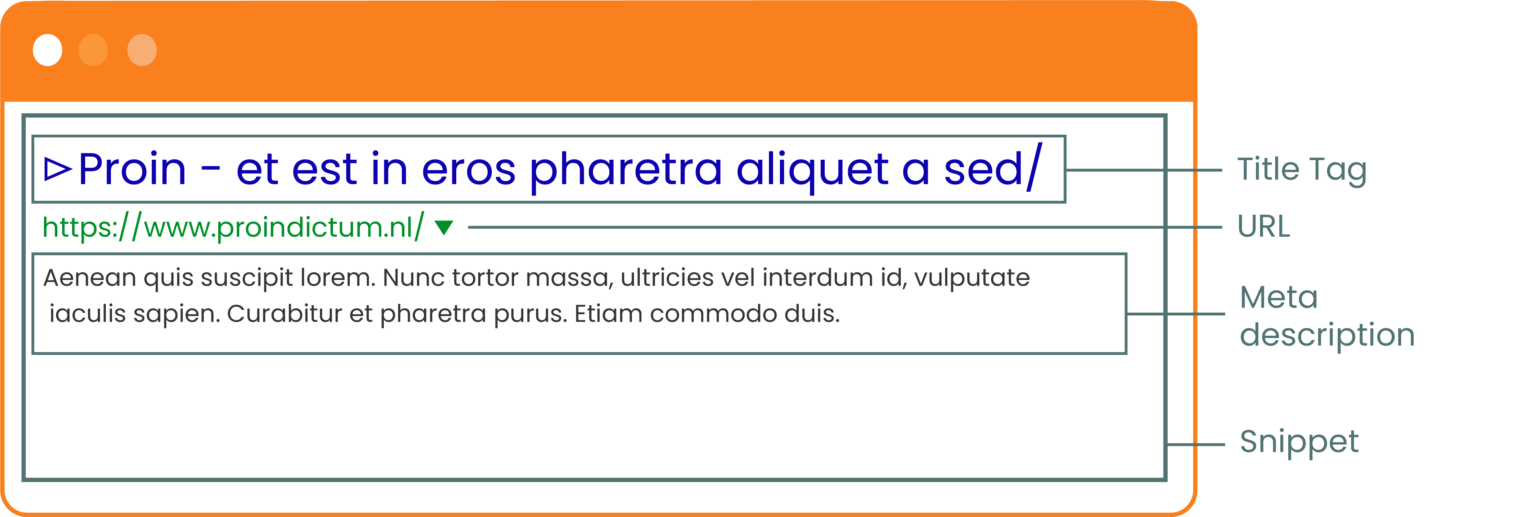
The page title and meta description play an important role in increasing your CTR (click-through rate). That is why it is important to check them and optimise them where necessary. The same applies to the title tag. It plays a role in how your website ranks.
In SEO analyses, it is also useful to look at your Domain Authority and Page Authority. We also recommend looking at the link building opportunities (backlinks) for your top 5 keywords. That way you ultimately generate more SEO traffic.
Make sure you know how many internal and external links your website has, and from how many websites these external links point to your website.

In conclusion, carrying out an SEO audit is important if you want to be found better in search engines and end up higher in the SERPs. Better findability attracts more visitors to your website and leads to a higher conversion rate.
By getting started with search engine optimisation, you give your website a much better chance of higher rankings.
After reading this article, do you think: “DGTLbase, let your SEO experts be the personal SEO checker for my website (website SEO, general SEO, the technical side of SEO or creating valuable SEO content for my website)”? Our SEO specialists are ready for you!
Below are three articles that will help you further with an SEO check: